Home

AI Tools

Canva AI
Independent Review

Canva AI

Canva AI is an all-in-one creative assistant that helps users generate and edit designs, images, text, documents, presentations, and interactive content through natural-language prompts inside Canva.

Independently reviewed using official sources and practical use cases.

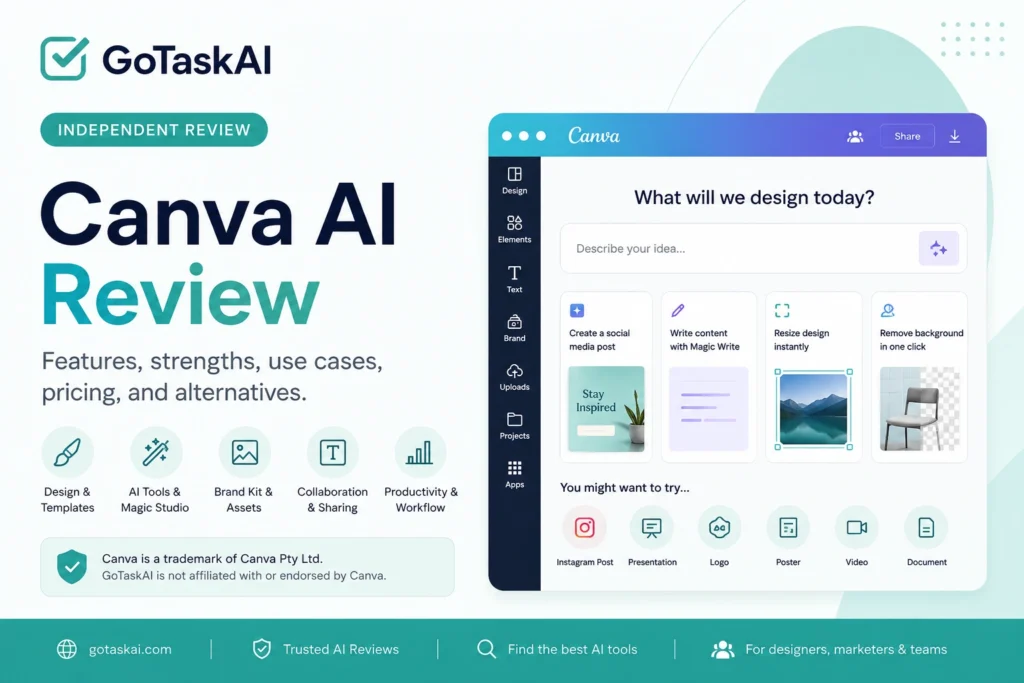
Canva AI creative design assistant logo
GoTaskAI Score
4.6
Pricing
Freemium
Tool Type
Provider
Canva

Quick Verdict

Canva AI is a practical all-in-one creative assistant for generating designs, images, presentations, documents, text, and other visual content inside Canva. It is especially useful for marketers, content creators, educators, small businesses, and teams that want to move from an idea to a finished asset without switching between several tools. The free plan provides limited AI access, while higher usage limits and more advanced creative, brand, and collaboration features require a paid Canva plan.
Best For
Marketers, content creators, educators, small businesses, social media managers, designers, and teams that regularly create visual content, presentations, documents, and branded assets.
Worth It?
Yes—especially for users who already work in Canva and want AI-assisted design, writing, image generation, and content creation in one familiar workspace.
Main Strength
Combines AI design, writing, image generation, editing, presentations, and publishing inside one integrated creative platform.
Main Weakness
AI usage is limited on the free plan, while higher limits and many advanced design, brand, and collaboration features require Canva Pro, Business, or Enterprise.

What is Canva AI?

Canva AI is an integrated creative assistant that helps users generate and refine designs, images, text, presentations, documents, and interactive content through natural-language prompts. It works inside Canva’s broader visual workspace, allowing generated content to remain editable rather than producing only static outputs. The platform brings together tools for writing, image creation, photo editing, layout generation, resizing, translation, and brand-aware content production. It is particularly useful for users who want to move quickly from an idea to a polished asset without mastering complex design software. However, generated visuals, text, data, and brand materials should still be reviewed for accuracy, originality, quality, and appropriate usage rights.
Canva AI creative design assistant interface and features

Key Features

✍️

AI Design Generation

Creates editable designs, presentations, documents, social media posts, and other visual content from natural-language prompts.

💻

Magic Media Image and Video Creation

Generates original images and short video content from text prompts or existing media inside Canva.

🔎

AI Photo Editing

Adds, removes, replaces, or expands visual elements using tools such as Magic Edit, Magic Eraser, and Magic Expand.

🎓

Magic Write and Brand Voice

Generates, rewrites, summarizes, and refines text while helping paid users maintain a more consistent brand tone.

Resize, Translate, and Format Conversion

Adapts designs for different platforms, languages, dimensions, and content formats without rebuilding them manually.

🚀

Interactive Content and Canva Code

Helps users create websites, calculators, quizzes, and other interactive experiences without traditional coding.

Pros & Cons

Canva AI is strongest when users want to generate, edit, and publish different types of creative content without leaving one familiar platform. It combines AI-assisted design, writing, image generation, presentations, photo editing, and collaboration in an accessible workspace. However, generated content still requires review, and access to advanced features and higher AI usage limits depends on the selected Canva plan.

Pros

  • Combines AI design, writing, image generation, editing, and publishing in one platform
  • Produces layered and editable designs instead of only static AI images
  • Easy to use for people without professional design experience
  • Supports presentations, documents, social media content, websites, images, and branded materials
  • Integrates AI tools with Canva templates, stock content, collaboration, and publishing features
  • Offers limited access to several AI-powered tools on the free plan

Cons

  • Free-plan AI usage limits can be restrictive for frequent creators
  • Many advanced tools, premium assets, and higher usage limits require a paid plan
  • Generated designs and text may still require substantial manual refinement
  • AI-generated facts, data, images, and written content require careful review
  • The large number of tools and options can feel overwhelming to new users
  • Feature availability and AI limits can vary by plan, account, language, and region

Pricing

Canva offers a Free plan with core design tools, free templates, and limited access to AI-powered features. Monthly AI usage depends on the tool tier, with the Free plan allowing up to 200 Standard AI uses or 20 Premium AI uses. Canva Pro adds premium content, more than 40 AI-powered tools, Brand Kit, Background Remover, Magic Resize, and higher AI limits. The current US price is $15 per month or $120 per year for one person. Canva Business costs $20 per person per month and provides higher AI usage and advanced collaboration features. Prices, taxes, and plan availability may vary by country.
Canva Free
$0 / month
✔ Free templates and core design tools
✔ Limited access to Canva AI features
✔ Up to 200 Standard or 20 Premium AI uses/month
✔ Editable designs, presentations, documents, and social content
✔ Basic photo, video, and collaboration tools
Canva Pro
Most Popular
$15 / month or $120 / year
✔ More than 40 AI-powered tools
✔ Up to 2,000 Standard AI uses/month
✔ Premium templates, images, videos, audio, and fonts
✔ Brand Kit, Background Remover, and Magic Resize
✔ Higher AI limits and advanced editing features
Prices, plan availability, currencies, and taxes may vary by country. Check the official Canva AI pricing page before subscribing.

Best Use Cases

Common Canva AI Use Cases

✔ Create social media posts, ads, banners, thumbnails, and other marketing visuals from prompts
✔ Generate and edit presentations, documents, reports, and branded business materials
✔ Create original images, backgrounds, illustrations, and visual assets for content projects
✔ Rewrite, summarize, translate, and adapt text for different audiences and formats
✔ Help teams produce consistent on-brand content using shared templates, brand assets, and collaboration tools

Top Use Case

Marketing and Visual Content

Create social media graphics, advertisements, presentations, campaign assets, thumbnails, documents, and other visual content from prompts, then refine everything inside Canva’s editor.

Best For Marketers, content creators, social media managers, educators, and small businesses
Core Advantage Editable AI Designs

Teams and Brand Content

Help teams create consistent branded content using shared templates, brand colors, fonts, logos, collaboration tools, and higher AI access within one workspace.

Brand Control Centralized
Team Templates Reusable
Collaboration Real Time

Related AI Tools

ChatGPT is a flexible AI assistant for writing, research, coding, learning, brainstorming, and everyday productivity. It is one of the easiest AI tools to start with, but its answers still need review when accuracy, sources, or professional decisions matter.
Gemini is Google’s AI assistant for writing, research, brainstorming, summaries, productivity, and working across Google’s ecosystem. It is especially useful for users who already rely on Google Search, Gmail, Docs, Drive, or Workspace tools.
Grammarly is an AI writing assistant that helps users correct mistakes, improve clarity and tone, rewrite sentences, and create stronger content across everyday apps and websites.

Final Verdict

Recommended for

Best for marketers, content creators, educators, social media managers, small businesses, designers, and teams that regularly create visual, branded, presentation, and marketing content.

Verify Before Use

Review AI-generated text, images, facts, translations, layouts, licensing conditions, and brand materials carefully before publishing or using them in important commercial, educational, legal, or public content.

Frequently Asked Questions

What is Canva AI used for?

Canva AI is used to generate and edit designs, images, presentations, documents, written content, websites, videos, and interactive experiences through natural-language prompts inside Canva’s visual workspace.

Yes. Canva Free includes access to a selection of AI-powered tools with limited usage. Paid plans provide higher AI allowances, premium content, more advanced editing tools, and additional brand and collaboration features.

Canva AI is Canva’s broader conversational creative assistant and AI-powered creation experience. Magic Studio is the collection of individual AI features inside Canva, including tools for writing, image generation, photo editing, resizing, translation, and design creation. They are parts of the same Canva platform, not separate providers.

Yes. A major advantage of Canva AI is that many generated designs remain layered and editable inside the Canva editor. Users can change text, images, colors, fonts, layouts, and individual elements instead of receiving only a fixed image.

Canva allows AI-generated content to be used for personal and commercial projects, subject to its terms and applicable policies. However, users are responsible for checking trademarks, logos, copyrighted works, permissions, and whether the output is suitable for commercial use. Canva does not guarantee that every AI-generated output is cleared for use.

No. Canva AI can speed up ideation, layout creation, writing, image generation, and routine editing, but professional designers may still be needed for complex branding, original art direction, accessibility, detailed production work, and high-stakes commercial projects. AI-generated outputs should also be reviewed for accuracy and quality.

Ready to try Canva AI?

Start with Canva’s free plan to test AI-assisted design, image generation, writing, presentations, and content editing. Upgrade only if you need higher AI limits, premium assets, advanced editing tools, Brand Kit, Magic Resize, or team collaboration features.