
Hands-On Tested

Leonardo.Ai

Leonardo.Ai is a generative creative platform for producing and editing images, videos, and design assets. It offers daily free tokens and a broad model selection, but output consistency, text accuracy, and control still require careful human review.

Independently reviewed using official sources and 3 hands-on tests conducted by GoTaskAI in August 2026. Last verified: August 16, 2026.

Leonardo.Ai logo
Pricing
Freemium
Tool Type
Provider
Leonardo.Ai (Canva)
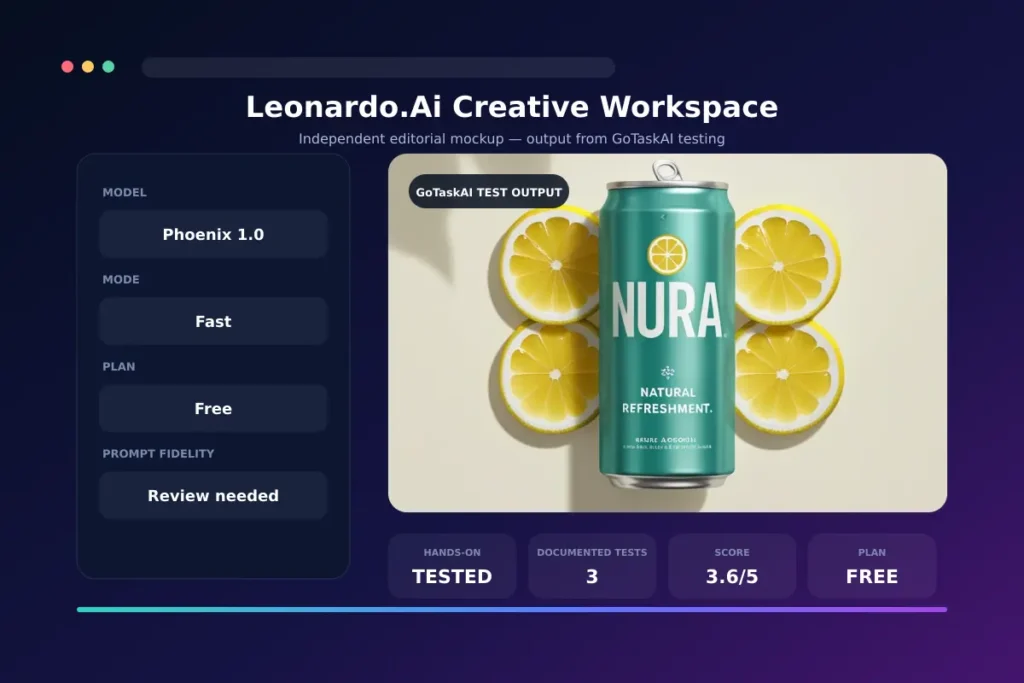
Testing summary: GoTaskAI completed three documented Free-plan workflows: text-to-image product generation, image-to-image editing, and background removal. We also ran one uncounted influence-remediation attempt and one uncounted Arabic diagnostic. Visual quality was often appealing, but exact prompt compliance, editing control, text accuracy, and cleanup consistency remained unreliable.
Plan used: Free plan — Phoenix 1.0, Fast mode
Best result: The strongest product-advertisement output scored 7/10 and delivered an attractive, polished visual composition.
Main limitation: The tool repeatedly missed exact object counts, rendered text inaccurately, and preserved unwanted elements during image-to-image editing.
Human review needed: Required

Quick Verdict

Leonardo.Ai offers an approachable way to generate, edit, and refine visual assets, with daily free tokens and a wide model selection. In our hands-on testing, it produced attractive product imagery but often missed exact object counts, text, and structural editing instructions. It is useful for ideation and iterative creative work, but results require careful review before professional use.
Best For
Creators, marketers, and small teams exploring AI images, visual concepts, and lightweight editing.
Worth It?
Yes—for visual ideation and experimentation, especially on the free plan; precision-focused production still needs human review.
Main Strength
Broad model selection and an accessible daily free allowance.
Main Weakness
Inconsistent instruction following, text rendering, and structural editing precision.

What is Leonardo.Ai?

Leonardo.Ai is a generative creative platform for producing and editing images, video, and other visual assets through a web-based workspace. Users can choose from multiple generation models, create images from text, work with reference images, remove backgrounds, upscale outputs, and explore additional video, audio, 3D, and workflow tools. A free plan provides daily Fast Tokens, while paid plans add larger token allowances, private generations, and higher usage limits. In GoTaskAI’s hands-on testing, Leonardo.Ai was easy to start and capable of attractive product visuals, but it struggled with exact text, object counts, and major image-to-image changes. It is best treated as a flexible creative assistant rather than a fully dependable production system.
Leonardo.Ai image generation interface

Key Features

Multi-Model Image Generation

Create visuals from text prompts using a broad selection of AI models and styles.

Reference-Guided Creation

Use image, style, content, or character references when supported by the selected model.

Image-to-Image Editing

Modify uploaded or generated images with adjustable reference-influence controls.

Image Enhancement Tools

Remove backgrounds, upscale images, and refine generated assets within the platform.

Video and Motion Creation

Generate videos or animate visual assets using supported models and workflows.

Integrated Creative Workspace

Access image, video, audio, 3D, Flow State, Blueprints, and asset-library tools from one interface.

Pros & Cons

Leonardo.Ai combines a broad creative toolset with an accessible free entry point, but our testing showed a clear gap between visually attractive results and precise compliance. Its strongest value is rapid visual exploration; its main limitations appear when a task demands exact text, object counts, layout preservation, or dependable structural edits.

Pros

  • Daily Fast Tokens are available without a paid subscription.
  • Broad selection of image-generation models and creative styles.
  • Can produce attractive, polished visuals suitable for early concepts.
  • Clean web interface with fast generation and accessible controls.
  • Supports reference images, image-to-image editing, background removal, and upscaling.
  • Combines image, video, audio, 3D, and workflow tools in one platform.

Cons

  • Frequently misses exact object counts and detailed prompt constraints.
  • Generated labels and small text may be incorrect or garbled.
  • Image-to-image editing may preserve elements the user explicitly requests to remove.
  • Background removal can leave faint residual or ghost elements.
  • Free-plan generations are public; Private Mode requires a paid plan.
  • Phoenix 1.0 failed our Arabic diagnostic, although this result should not be generalized to every Leonardo model.

Pricing

Leonardo.Ai offers a Free plan with 150 Fast Tokens per day, public creations, Basic quality, and one personal collection. Essential costs $12 per month and includes 8,500 monthly Fast Tokens, private generations, Enhanced quality, unlimited collections, and up to 10 personal AI models. Higher individual tiers are Premium at $30 per month and Ultimate at $60 per month, with larger token allowances and relaxed-generation benefits on supported models. Annual billing advertises savings of up to 20%. Prices exclude tax, and token costs vary by model and action. Check the official pricing page before subscribing because limits may change.
Free Plan
$0/month
✔ 150 Fast Tokens per day
✔ Public creations
✔ Basic quality settings
✔ One personal collection
✔ Image and video generation within available token limits
Essential
Entry Paid Plan
$12/month
✔ 8,500 Fast Tokens per month
✔ Token Bank capacity of 25,500
✔ Private generations and Enhanced quality
✔ Unlimited personal collections
✔ Up to 10 personal AI models and two simultaneous generations
Prices, plan availability, currencies, and taxes may vary by country. Check the official Leonardo.Ai pricing page before subscribing.

Best Use Cases

Common Leonardo.Ai Use Cases

✔ Generate early product-advertising concepts before final design work.
✔ Explore visual styles, color palettes, compositions, and art directions.
✔ Create reference-guided variations from existing images and concepts.
✔ Prepare mockups by removing backgrounds or upscaling selected outputs.
✔ Develop storyboard frames and visual assets for video or social content.

Best Fit

Rapid Visual Ideation

Generate multiple visual directions quickly for campaigns, product concepts, social posts, or creative presentations. The strongest results come from using Leonardo.Ai for exploration and then refining the selected output manually.

Best For Concept art, marketing mockups, social visuals, and creative brainstorming.
Best T1 Output 7/10

Precision-Dependent Production

Use cautiously for packaging, exact text, fixed object counts, and structural image edits. Our tests showed that visually attractive results may still ignore explicit instructions and require correction before professional use.


Counted Tests 3
T1 Batch Average 4.5/10
Human Review Required

Related AI Tools

Canva AI is an all-in-one creative assistant that helps users generate and edit designs, images, text, documents, presentations, and interactive content through natural-language prompts inside Canva.
Runway is an AI creative platform for generating and editing videos, images, and audio in one workspace. It combines advanced generative models with practical editing tools and reusable workflows for creators, filmmakers, marketers, and production teams.
ChatGPT is a flexible AI assistant for writing, research, coding, learning, brainstorming, and everyday productivity. It is one of the easiest AI tools to start with, but its answers still need review when accuracy, sources, or professional decisions matter.

Final Verdict

Recommended for

Creators and small teams prioritizing fast visual ideation over exact production control.

Verify Before Use

Free-plan generations are public. Leonardo retains broad rights to them, although free users receive a non-exclusive, royalty-free commercial licence. Review every output for text, artifacts, brand accuracy, licensing, and privacy before use.

Frequently Asked Questions

Is Leonardo.Ai free to use?

Yes. The Free plan provides 150 Fast Tokens per day, Basic quality settings, and access to image and video generation within the available token allowance. Free-plan creations are public.

How much does Leonardo.Ai cost?

Leonardo.Ai offers a Free plan at $0. Monthly individual plans currently start with Essential at $12, followed by Premium at $30 and Ultimate at $60, excluding tax; annual billing may provide savings of up to 20%.

Can I use Leonardo.Ai images commercially?

Yes. Free users receive a non-exclusive, royalty-free commercial licence, although Leonardo retains broad rights to free-tier creations. Paid subscribers retain ownership and intellectual-property rights to generated images, subject to the applicable terms and third-party rights.

Are Leonardo.Ai generations private?

Free-plan generations are public. Private generations are available with paid individual plans, so users handling confidential or unreleased material should verify their plan before uploading or generating assets.

Is Leonardo.Ai reliable for product images and accurate text?

It can create attractive product visuals, but our testing found errors in object counts, labels, small text, and structural editing instructions. Branding and packaging outputs should always receive human review.

Does Leonardo.Ai work well with Arabic prompts?

Results may vary by model and configuration. In our limited Phoenix 1.0 Fast diagnostic, all four outputs were unrelated to the requested Arabic product scene, so Arabic users should test their chosen model before depending on it.

Ready to try Leonardo.Ai?

Explore Leonardo.Ai with its daily free tokens, compare available models, and test your own workflows before choosing a paid plan.