
Independently reviewed using official sources and 3 hands-on tests conducted by GoTaskAI in August 2026. Last verified: August 15, 2026.

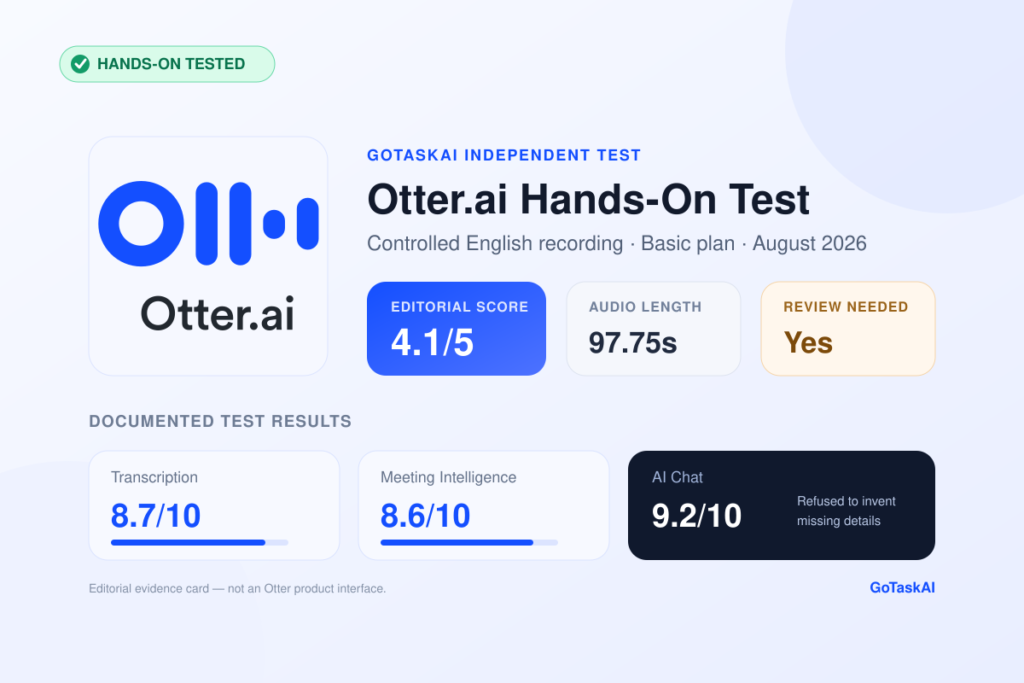
Otter turns recorded or imported audio into searchable text linked to playback. In our 97.75-second controlled test, it captured every targeted date, amount and percentage correctly, making the transcript useful for quickly locating factual details.
The generated summary preserved important distinctions instead of flattening them. It correctly reported that the launch was postponed rather than canceled and kept the proposed 15% advertising-budget increase separate from the decisions that were actually approved.
Otter can extract follow-up tasks from a conversation, but the output should not be treated as final. In our test, it converted the approved decision to use DeepL into an implementation task even though the meeting assigned no owner or deadline.
Users can question a meeting instead of rereading the full transcript. When we requested Daniel Brooks’s deadline and the name of a law firm—two details absent from the recording—AI Chat explicitly said they were not stated rather than inventing answers.
Otter connects transcript text with audio playback and supports speaker identification, helping users return to the original recording when a name, number or assignment needs verification. Our scored test used one speaker, so multi-speaker accuracy was not evaluated.
Users can add names, terminology and reference codes to improve recognition. However, adding four exact entries in our remediation corrected only DeepL; GoTaskAI, ElevenLabs and the structured reference code remained incorrect, so the feature did not remove the need for manual correction.
Otter.ai offers four plans in USD, each aimed at a different level of meeting use:
GoTaskAI testing note: All scored tests in this review were conducted on Basic. Paid-plan features and limits were verified through Otter’s official pricing information but were not hands-on tested. Prices were checked on August 15, 2026.
✔ Turn project meetings into searchable records of budgets, dates, decisions and human-checked follow-up tasks.
✔ Transcribe interviews and research sessions, then return to the synchronized audio when a quotation or name needs verification.
✔ Convert lectures, training sessions and internal briefings into summaries that can be searched instead of replayed from beginning to end.
✔ Review client or sales conversations and prepare follow-up notes without confusing discussed proposals with approved decisions.
✔ Question a meeting through AI Chat to locate specific facts, identify missing information and verify the generated record before acting.
Turn a completed meeting into a searchable record of figures, decisions and next steps. In our controlled test, Otter preserved every targeted number, correctly understood that the launch was postponed rather than canceled, and kept a rejected proposal separate from approved decisions.
Otter was strongest when retrieving numerical facts and answering questions about what the meeting did or did not contain. The same workflow also exposed its main limitation: a polished transcript still required human review for critical terminology and generated assignments.



Otter.ai earns a GoTaskAI Editorial Score of 4.1/5. It is most useful as a fast meeting-recall system that turns a recording into a transcript, summary, action layer, and searchable AI workspace. Our results support using it to accelerate meeting review—but not treating every generated output as a final record without human verification.
In our controlled 97.75-second English recording, Otter preserved every tested date, amount, percentage, and major decision. It correctly distinguished a postponed launch from a cancellation, retained the rejected 15% advertising-budget proposal as unapproved, and refused to invent a deadline or law-firm name that the recording never stated. The scored results were 8.7/10 for transcription, 8.6/10 for meeting intelligence, and 9.2/10 for AI Chat.
The main reliability weakness appeared where exact wording and operational ownership mattered most. None of the four critical terms was transcribed exactly on the first attempt, including brand names and the structured reference code. More importantly, Action Items converted a genuine platform decision into an unassigned implementation task that had no owner or deadline in the source recording. The underlying decision was real, but the generated task was not fully supported—so it should not be acted on without checking the transcript or audio.
Custom Vocabulary improved only one of the four target terms, while producing no measurable improvement in the original transcription score. Reaching the exact corrected transcript required 39.24 seconds of processing and a 2:07 correction workflow, for a total of 2:46.24 from upload to ready-to-use text. These findings apply specifically to an imported, controlled, single-speaker English recording on the Basic plan; they do not establish performance for live meeting bots, calendar automation, multi-speaker conversations, Arabic transcription, or paid-plan workflows.
Our verdict: Otter.ai is worth considering for teams, consultants, researchers, and students who need quick transcripts, summaries, and reliable meeting Q&A—and who can include a short review step before sharing decisions or assigning work. Verify names, reference codes, deadlines, and task ownership whenever accuracy has operational consequences. You can compare it with other options in the GoTaskAI AI Tools directory or read our Notion AI review for a broader workspace-focused alternative.
Best for teams, consultants, researchers, and students who want fast English meeting transcripts, useful summaries, action-item extraction, and grounded follow-up Q&A—and can include a brief human review before using the output as an official record.
Do not rely on Otter.ai alone for names, brand terms, reference codes, deadlines, or task ownership. In our test, critical terms were missed and a genuine decision was converted into an unsupported action item. Verify these details against the audio before sharing minutes, assigning work, or making operational decisions.
Yes. Otter.ai’s Basic plan is free and includes 300 monthly transcription minutes, live transcription, speaker identification, AI Chat, and three lifetime audio or video file imports. These limits were verified in August 2026 and may change over time.
Otter.ai scored 8.7/10 in our controlled English transcription test. It captured every tested date, amount, and percentage correctly, but none of our four critical brand terms and reference codes was exact on the first attempt. Accuracy therefore depends on the audio and terminology, and important details should be checked against the recording.
Yes. Otter.ai generated a useful summary, outline, and action-item list, earning 8.6/10 in our meeting-intelligence test. It preserved important distinctions, including a postponed rather than canceled launch, but it also converted a real decision into an unsupported task with no stated owner or deadline. Review action items before assigning work.
Otter AI Chat scored 9.2/10 in our test. It correctly answered questions about meeting decisions and refused to invent an unstated deadline or law-firm name. However, one response slightly overclassified a meeting detail, so sensitive answers should still be confirmed in the transcript or audio.
It can help, but our results were limited. After adding four exact entries to Custom Vocabulary, Otter improved only one of the four target terms and corrected two of seven affected occurrences. Names, brand terms, abbreviations, and reference codes may still require manual correction.
As of our August 2026 verification, Arabic was not included in Otter.ai’s official list of supported transcription languages, and we did not test Arabic transcription. Arabic-speaking users should confirm the current language list before subscribing or relying on Otter.ai for Arabic meetings.